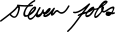
Apple co-founder
Steve Jobs
A compact, fast-moving signature with a sharp rhythm that fits users looking for a confident tech-founder feel.
This free signature generator lets you type or draw a signature and refine it directly in your browser. You can move from first input to final preview in one focused workflow, then sign up or log in before downloading the finished asset.
Signature inspiration
Browse well-known signature references before creating a typed or drawn signature in the generator.
Apple co-founder
A compact, fast-moving signature with a sharp rhythm that fits users looking for a confident tech-founder feel.
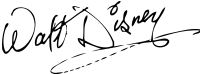
Animator and studio founder
Recognizable for its playful curves and expressive lettering, useful inspiration for a more whimsical signature style.
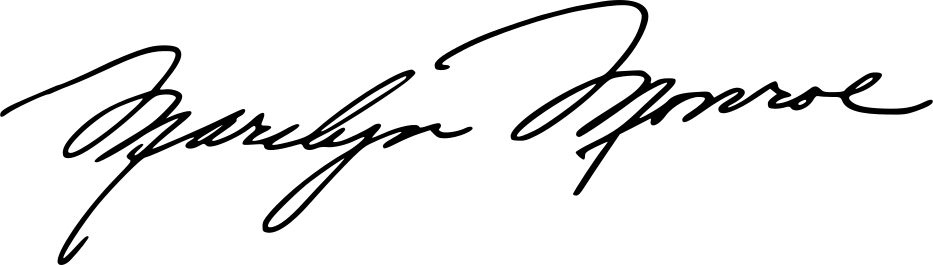
Actor and cultural icon
A flowing, glamorous cursive reference with a strong name silhouette and a polished personal-brand quality.
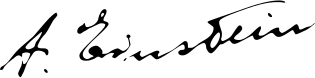
Theoretical physicist
Loose, direct, and highly personal, with a natural handwritten feel rather than a heavily ornamental style.
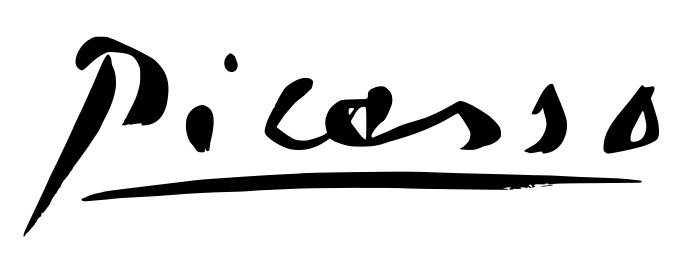
Artist
Minimal and art-forward, a useful reference for users who want a signature that reads like a visual mark.
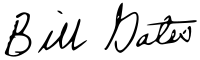
Microsoft co-founder
A businesslike reference with clear initials and practical legibility, suited to restrained professional signatures.
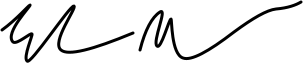
Entrepreneur
Fast, angular, and compressed, helpful for exploring a modern signature with strong motion and abbreviation.
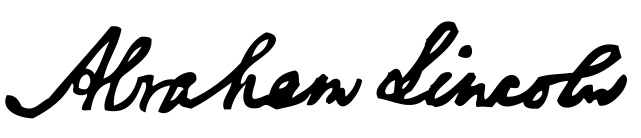
U.S. president
A historic handwritten reference with elegant spacing and a formal longhand structure.

Musician
Expressive and energetic, suited to creative users looking for more personality in their signature shape.

Artist and inventor
A classic historic reference for users interested in a refined, artful handwritten identity.
Type your name to generate a signature style, or draw your real signature with touch or mouse input.
Adjust the style, size, color, or stroke settings until the signature matches the look you want.
When the result is ready, sign up or log in to download a transparent signature file from the same browser workspace.
The tool fits fast signature creation needs where people want to prepare a clean asset quickly and download it after signing in.
Create a signature you can reuse across forms, profiles, and everyday digital workflows.
Prepare a polished signature asset for portfolios, email footers, personal sites, or lightweight brand usage.
Generate a signature fast when you need to send a clean asset to a teammate, client, or another tool.
Strong signature generator pages focus on fast creation, low friction, and a clear path to export. This page stays centered on that job instead of trying to bundle unrelated workflows into the same surface.
Typed signatures, hand-drawn input, and transparent asset export live in one focused browser flow so people can get the file they need and move on quickly.
Type your name or draw your signature, refine the look, and get the asset ready for download in minutes.
Switch between font based signatures and hand drawn signatures without leaving the same browser workspace.
Adjust the style, size, color, and stroke feel until the signature matches the look you want to keep.
Prepare the signature in the browser, then sign up or log in to download a clean asset when it is ready to use.
The page is designed for fast creation and export in the browser, which reduces friction for quick signature tasks.
Type a name or draw a signature, refine the result, and export it without installing software or opening extra tools.
Prepare clean signature assets for forms, profiles, lightweight documents, or brand touchpoints and download them after sign-up or log-in.
Start with the free signature generator immediately. Create and refine the signature first, then sign up or log in when you are ready to download.
Trusted by professionals and featured on leading platforms








A signature generator is an online tool that helps you create a digital signature by typing your name or drawing it by hand. On this page, you can refine the look in the browser and prepare a downloadable signature asset.
You can create a signature online by typing your name to generate a styled version or drawing it directly on the canvas. After that, you can adjust the look and prepare the signature for download as a transparent asset.
Yes. You can type your name to generate a signature style or draw a handwritten signature directly on the canvas with mouse or touch input.
Yes. You can switch between typed and drawn input, try different styles, and tune the look before exporting the final signature asset.
Yes. The generator is built to export clean signature assets that are easy to place on forms, profiles, light documents, and digital workflows.
Yes. You can prepare the generated signature by itself as a transparent PNG, and SVG is available where the source allows it. You will need to sign up or log in before downloading.
You can export transparent signature assets such as PNG, and SVG is available when the generated source supports it.
Yes. After you sign up or log in, you can save typed or drawn signatures and open them later from My signatures.
You can create and refine a signature without an account, but you need to sign up or log in before downloading the final asset.
Yes. You can create and refine signatures for free in the browser.